When AI makes decisions - who is accountable?
The Decision Layer makes every AI decision traceable, auditable, and compliant with employee oversight requirements.
AI agents can process sick leave, classify invoices, and review contracts. But who decides what the agent may do on its own and where a human must step in? The Decision Layer defines this - for every single process step.








Why AI Projects in HR Fail
HR processes depend on the knowledge of individual employees. Who knows which special leave policy applies at which location? Who remembers the difference between the company agreement from 2019 and the updated version from 2024? Who checks whether sick leave was correctly validated against the collective agreement?
This knowledge lives in people's heads, in email threads, in folders nobody can find. When someone leaves the team, the knowledge leaves too.
AI can help - but only when it's clear which rules apply. And who is ultimately responsible.
What Is the Decision Layer?
The Decision Layer decomposes every business process into individual decision steps and defines upfront for each: Does a human decide, does a rule set apply, or does the AI decide autonomously?
HUMAN: The architecture enforces human review. For discretionary decisions, discrimination risk, employee representation matters, and value thresholds above defined limits. The agent provides full context and a recommendation - but a human decides. This escalation is technically enforced, not organisationally agreed.
RULE SET: The decision is deterministic - there is no room for interpretation. The collective agreement states X, so X applies. A deadline expires on date Y, so rule Z triggers. Rule sets are versioned: every change creates a new version, previous versions remain traceable. Here, the agent is an executor - not because it cannot do more, but because there is nothing to interpret.
AI AUTONOMOUS: The agent makes independent decisions - because it is confident enough, has permission, and demonstrably performs the task better than manual processing. It interprets documents, classifies situations, evaluates context, and recognises patterns. This is not if-then-else - this is judgment within defined guardrails. Confidence Routing controls: high confidence and low risk leads to autonomous decision. Low confidence or high risk leads to escalation to a human. This Confidence Routing is precisely what distinguishes the Decision Layer from RPA.
(US: In the US, where works councils do not exist, the human review tier maps to internal compliance review, EEOC-aligned anti-discrimination checks, and management approval workflows. The architecture is jurisdiction-agnostic - the governance rules adapt to your regulatory environment.) (UK: In the UK, the human review tier maps to obligations under the Equality Act 2010 and ICE Regulations 2004, plus internal governance frameworks.)
The Decision Layer is not an AI agent - it's the governance layer above. It complements existing systems like SAP SuccessFactors, Workday, or DATEV and controls what an AI agent may do with these systems. Every decision is automatically documented - for auditors, employee representation bodies, and internal audit.
How the Decision Layer addresses shadow AI and technically enforces company agreements is detailed in Article 6 of the Blueprint 2026.
| Without Decision Layer | With Decision Layer | |
|---|---|---|
| Who decides? | Unclear - the agent delivers a result | Defined per step: human, rule set, or AI |
| Company agreements | Manually followed - or forgotten | Stored as fixed rules, technically enforced |
| Traceability | Result visible, decision path not | Complete documentation per decision |
| Auditor | Must manually review each case | Direct access to decision documentation |
| Employee oversight | Blocks - no transparency | Supports - every decision traceable |
How Does the Decision Layer Work in Practice?
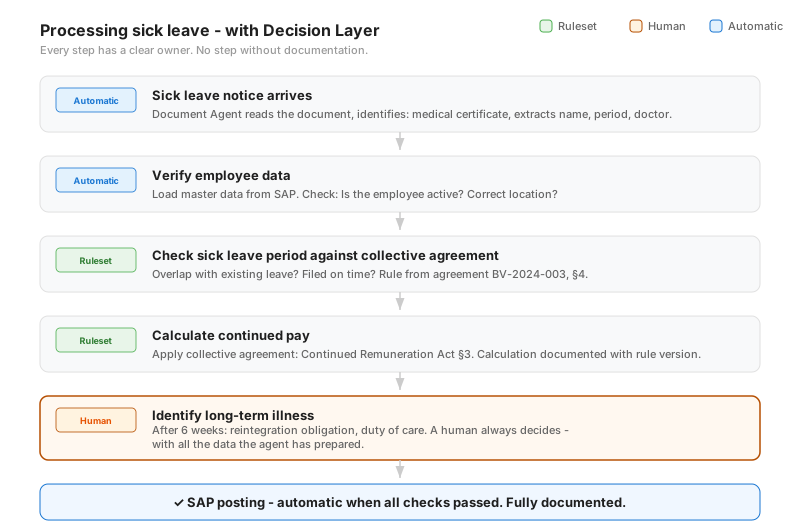
Sick leave example: 6 steps, clear accountability at each step. The Decision Layer defines for each: rule set, human, or automatic.
Why Do AI Projects Fail at Employee Oversight?
A common reason AI projects stall in enterprises: employee representation bodies block them. Not because they oppose technology - but because they lack transparency. In Germany specifically, works councils frequently halt AI deployments for this reason. The Decision Layer solves this:
Every governance framework - collective agreements, works agreements, or company policies - is stored as a fixed rule. The agent cannot bypass it.
For decisions affecting employees, a human always decides. Technically enforced, not just agreed upon.
Every AI decision is documented: What was checked, which rule applied, what was the result.
Employee representation bodies can trace how any decision was made, at any time.
The difference: Others promise transparency. The Decision Layer enforces it technically.
How Does an AI Decision Become Audit-Proof?
Your auditor sees exactly what happened.
- Which document was processed - and when?
- Which rule was applied - and in which version?
- How confident was the agent in its assessment?
- Did a human review - and if so, who?
- What was the result and when was it booked?
Which Decisions Can AI Make on Its Own?
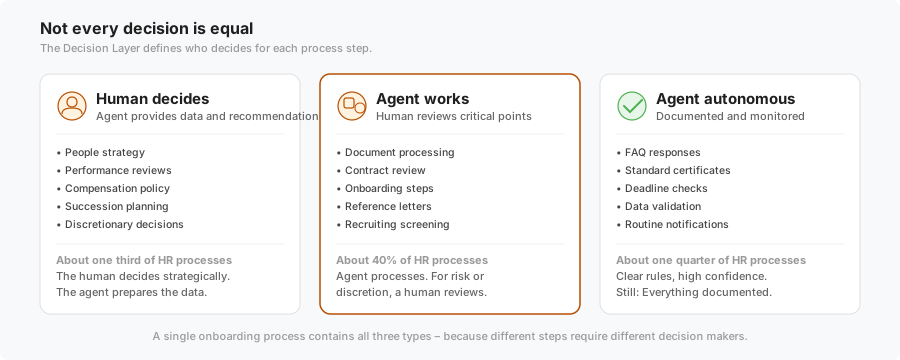
Some decisions an AI agent can make on its own. Others need human review. And for strategic questions, the agent only provides data. The Decision Layer defines this - per step, not per process.
Who Is the Decision Layer For?
Head of HR / CHRO
You want to use AI in HR - without losing control. The Decision Layer ensures governance frameworks are enforced, employee representation bodies have transparency, and every decision is traceable.
CFO / Head of Finance
Every AI-assisted booking is audit-proof. Your auditor sees the complete decision path. Correction bookings are reduced because deterministic rule sets leave no room for interpretation - and where the agent decides autonomously, Confidence Routing ensures escalation when needed.
Employee Representatives
No black box. Governance frameworks are technically stored and cannot be bypassed. For personnel decisions, a human always intervenes. In Germany: full co-determination transparency for works councils.
IT / CTO
Model-agnostic, infrastructure-agnostic, no vendor lock-in. Technical details in the Reference Architecture →
The Decision Layer for Your Processes
HR & People Operations
Sick leave, onboarding, employment references, contract review, policy queries. Compliant with employee representation requirements, EU AI Act compliant.
View HR Agent →Finance & Payroll
Document processing, account assignment, payroll, closing entries. Audit-proof. DATEV and SAP integration.
View Finance Agent →Document Processing
Invoices, contracts, certificates. Automatic classification and data extraction with rule-based validation.
View Document Agents →Is the Decision Layer EU AI Act Compliant?
The EU AI Act requires transparency, human oversight, and documentation of AI decisions. The Decision Layer addresses these requirements as an architectural principle - not as an afterthought compliance project.
Who Builds the Decision Layer?
The Decision Layer is developed and implemented by Gosign GmbH. Gosign is an Enterprise AI Infrastructure & Agent Engineering company based in Hamburg, Germany, with over 20 years of experience building complex systems for enterprises including Airbus, Deutsche Telekom, and Sony Music.
4-6 weeks to the first productive process. Full source code access, no vendor lock-in. Goal: After 12-18 months, you operate your agents independently.
Decision Layer in Practice: 48 HR Agents
The HR Agent Catalog shows for each of the 48 agents how the Decision Layer splits decisions across human, rule set, and AI agent - with complete micro-decision tables and decision records.
Explore the HR Agent Catalog →Deep Dive in the Agent Briefing (Gosign Magazine)
Frequently Asked Questions About the Decision Layer
What is a Decision Layer - simply explained?
The Decision Layer decomposes every business process into individual decision steps and defines upfront for each: Does a human decide, does a rule set apply, or does the AI decide autonomously? Where discretion or discrimination risk is involved, the architecture enforces human review. Where a decision is deterministic, the agent applies the rule set. Where the agent is confident enough and has permission, it decides independently. This is not if-then-else - this is judgment within defined guardrails.
Do I need to replace existing HR systems?
No. The Decision Layer complements SAP SuccessFactors, Workday, Personio, or DATEV. It controls what the AI agent may do with these systems - and documents every interaction. No migration, no system replacement.
How do employee representation bodies react to AI agents with a Decision Layer?
Typically positively - because the Decision Layer provides exactly the transparency that employee representation bodies demand. Governance frameworks become technical rules, personnel decisions stay with humans, and every AI decision is traceable. In Germany specifically, works councils value the co-determination transparency this architecture provides.
What distinguishes the Decision Layer from SAP Joule or Microsoft Copilot?
SAP Joule and Microsoft Copilot are AI agents - they execute tasks. The Decision Layer is not an agent. It's the governance layer above: it defines which decisions an agent may make autonomously, where a human must step in, and where rule sets apply. The Decision Layer is model- and vendor-agnostic.
How long does implementation take?
4-6 weeks to the first productive process. Week 1: Understanding your processes and rule sets. Weeks 2-5: Building and testing the first agent with Decision Layer. After that: Your team gradually takes over operations.
Which HR process costs you the most time?
Show us a specific process - we'll show you what the Decision Layer looks like for it.